I had been playing with using LimboAI Behavior tree in my previous games to handle NPCs, specifically them wandering around and exhibiting their own varying behaviour, not just moving back and forth. While I enjoyed the UI and debugs, it wasn’t feeling like a complete answer for all the things I wanted them to do in the environment.
I found Godot State Charts plugin and wanted to try it out instead.
Here’s what my Limbo Behaviour Tree looked like. This is an incredibly simple example as I was just using it to move between animations, really.
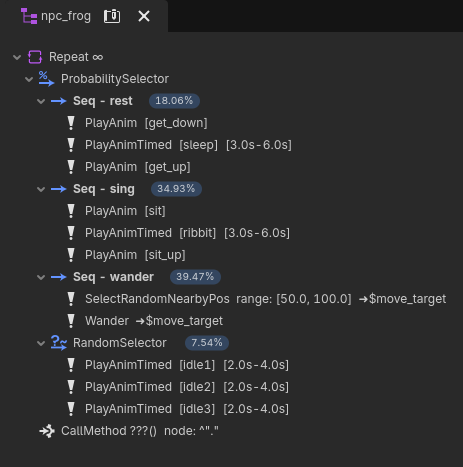
In each of the sequences you can see I’m calling a script. The idea is that you make all of your behaviour as modular as possible, separated out into different scripts that you call under different critera and scenarios using “selectors” and “sequences”.
Here is the script of the first behaviour in my tree, called PlayAnim as an example.
@toolextends BTAction
@export var anim_name: String = ""
func _generate_name() -> String:  return "PlayAnim  [%s]" % anim_name
func _enter() -> void:  scene_root.state_machine.travel(anim_name)  scene_root.velocity = Vector2.ZERO
func _tick(_delta: float) -> Status:  var playback = scene_root.animation_tree.get("parameters/playback")  if playback.get_current_node() == anim_name:    var anim_length = scene_root.animation_tree.get_animation(anim_name).length    if playback.get_current_play_position() >= anim_length - 0.05:      return SUCCESS  return RUNNING
They really don’t have to be complex, the point is so that you can make changes without finding digging through spaghetti script, and you can reuse scripts between characters.
State Charts was surprisingly simple to implement and get the hang of. Again, like Limbo, it took a moment to reorganise my thoughts to match how they were logically laying out behaviour. Once I got into it though, it was actually incredibly helpful to think about my game or my characters almost entirely in the state chart. Here’s an example of my NPC frogges.
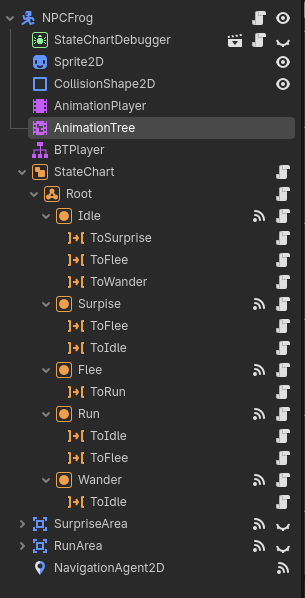
Each of their states is described, as well as whatever transitions it needs to get from that state to it’s other states. For example, Idle has three transitions, to surprise, flee, and wander. But Flee only has one transition to Run.
Just having the character know exactly what state it is in, has drastically cut down the amount of bugs I get. The same for the game states. So many bugs gone T_T
An example of what my NPC script looks like to connect to the state chart.
extends NPCclass_name npc_frogge
func _ready() -> void:  super._ready()  $StateChartDebugger.hide()
func _on_idle_state_entered() -> void:  super._on_idle_state_entered()  state_machine.travel("idle%d" % randi_range(1, 3))
func _on_surpise_state_entered() -> void:  state_machine.travel("surprise")
func _on_surprise_area_body_entered(body: Node2D) -> void:  if body is player_frogge:    $StateChart.send_event("character_nearby")
func _on_surprise_area_body_exited(body: Node2D) -> void:  if body is player_frogge:    $StateChart.send_event("character_left")
func _on_run_area_body_entered(body: Node2D) -> void:  if body is player_frogge:    flee_body = body    $StateChart.send_event("character_too_close")
func _on_run_state_entered() -> void:  _go_to(target)